
General Configuration
General configuration of TaskCollect is made via the TaskCollect Configuration option.

Note: NetSuite Classic Interface
Navigation: TaskCollect > Setup > Configuration

Important: A single TaskCollect Configuration record is utilised.
Main Settings
Credit Report Logo
The configuration record allows for an image to be uploaded to NetSuite’s file cabinet for display in generated credit report pdf documents.
Customer Onboarding Settings
Enabling Customer Onboarding
When not enabled the Customer record Debtor Status field defaults to “Active”. Customer Onboarding can be enabled by checking the Enable Onboarding setting.

When Customer Onboarding is enabled the Customer record Debtor Status field defaults to “Onboarding”.
A Customer is deemed as being onboarded once the following conditions have been met:
Credit report generated,
Credit limit is set,
Terms are set,
Optionally, Customer record has been approved.
Approval of Onboarded Customers
Customer Onboarding can leverage a NetSuite Workflow, that is configured to act on the Customer record, to add a layer of due diligence to the Customer on boarding process.
When the Customer Approval Workflow setting is populated, the workflow will be attached to a new customer record once all non-optional steps are satisfied as part of customer onboarding.

Comment: TaskCollect includes a template workflow that illustrates the minimum functionality the workflow should provide.
Workflow specification
Record Type - Customer
Release Status - Released
Initiation - Event Based
Event Definitions:
On Create - No
On View Or Update - No
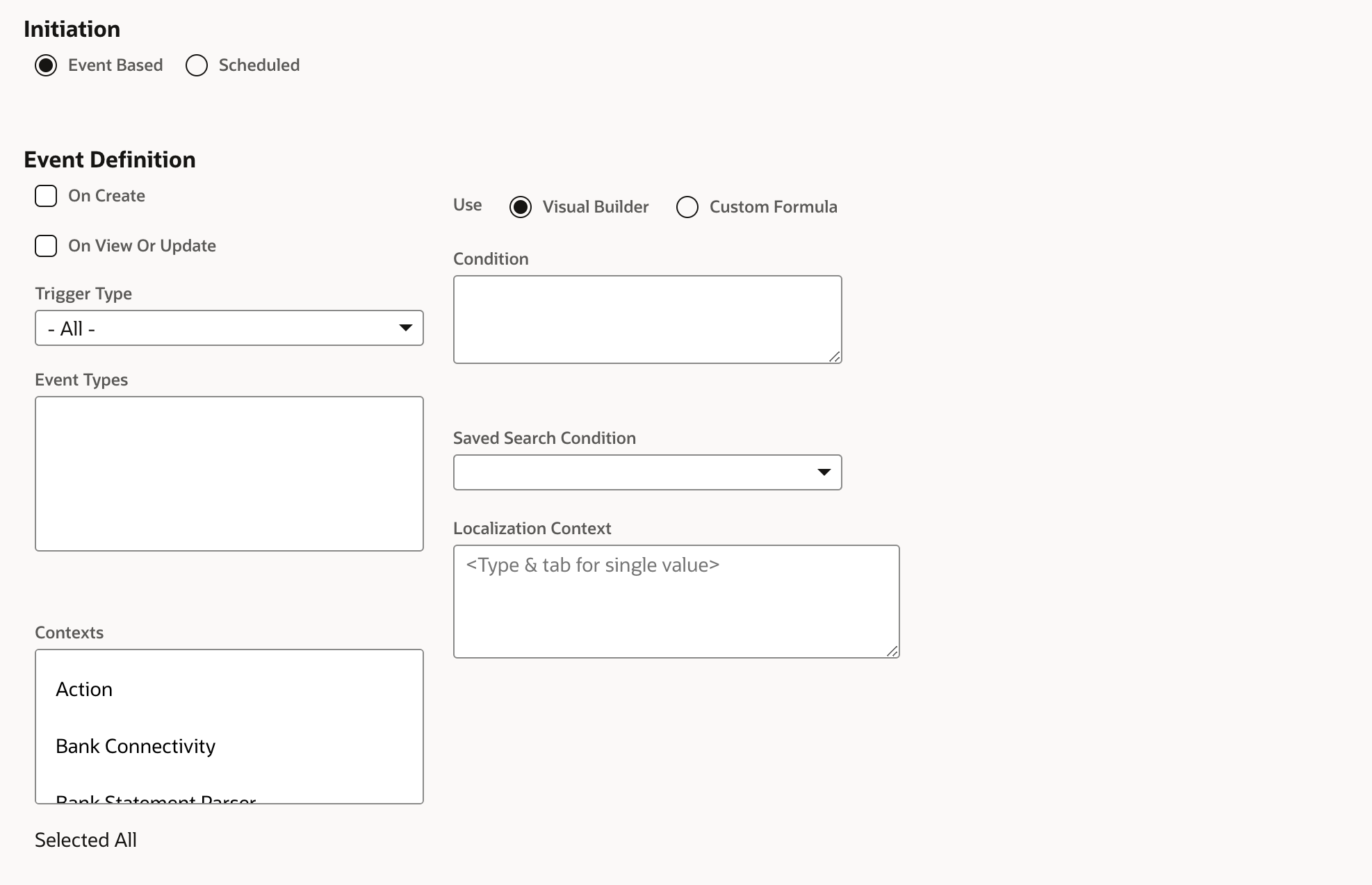
Comment: The workflow should not automatically attach the customer record, TaskCollect will attach the workflow once the customer record has met the onboarding requirements.
Debtor Status field to be set to “Active”
Customer Onboarding Transaction Control
Whilst the Customer record’s Debtor Status is equal to “On Boarding” TaskCollect configuration controls the behaviour users experience if they attempt to create transactions for that Customer.

Transactions under control
Opportunities
Estimates
Sales Orders
Invoices
Configured behaviour
Setting | Behaviour |
|---|---|
Allow | Transaction is allowed to be created, edited and view as normal. |
Warning | Transaction is allowed to be created, edited and view as normal; however, a warning is displayed to the user, advising them the customer has not been fully onboarded. |
Prevent | The users receives an error message displayed and they are prevented from saving the transaction. |
Task Workbench Settings
The Task Workbench displays all tasks that are due to be performed by the collections team on or before today. The Task Workbench can be viewed using two alternative “View Horizons”, allowing the Work Bench to display tasks with future due dates.
View Horizon Periods
View Horizon Period 1 and 2 allows the specifying of a number of days into the future the Task Workbench looks to display tasks with a due date that falls within the period.

Example: a View Horizone Period 1 (days) being set to 2 will allow the Task Workbench to display tasks that are due on or before today, or within the next 2 days.
Collections Settings
Default Collection Contact
A default collection contact may be specified, that will be attributed to outbound emails in the event a Collection Rep or Collection Team has not be specified on a customer record.