
Collection Team Auto-assignment Rules
Collections Reps and Collections Teams are automatically assigned to Customer records via Collection Team Auto-assignment Rules.
Each Auto-assignment Rule identifies which Collection Rep or Collection Team to assign and, a saved search that provides the logic for which Customers should be assigned to the given Rep or Team.
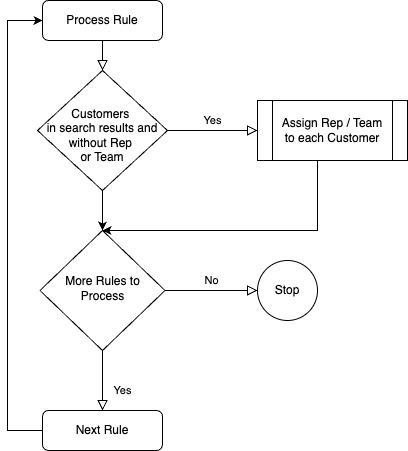
An automated process checks every hour for Customer records that do not have an assigned Collection Rep or Team, each Collection Team Auto-assignment Rule is checked in sequence1, checking the assignment logic to determine which Rep or Team should be applied.
1 The Collection Team Auto-assignment Rule record has a Sequence field, the rules are processed in ascending order
Collection Team Auto-assignment Logic

Note: It is not necessary for the saved search to remove Customer records that already have a Collection Rep or Collection Team allocated, the process automatically adds these criteria.
Creating Collection Team Auto-assignment Rules
Navigate: TaskCollect > Setup > Collections Team Auto-assignment Rules > New
Populate fields;
Name,
Sequence,
Collection Rep to assign,
Optionally, select a Collection Team to assign,
Assignment Logic Search.
Note: When assigning a Collections Team this is for customer segmentation purposes, a Collection Rep must also be assigned to the Customer. It is suggested the Collection Rep is an Employee record that is named as per the Collection Team; and, is configured with the return email address for the team.

Note: The Assignment Logic Saved Search should be of type Customer and Public.